
The Container Store suspended online ordering after a cyberattack the weekend of Nov. 14-15, 2026. Photo: Todd Van Hoosear, CC BY-SA 2.0, via Wikimedia Commons.
Somewhere in your life there is a junk drawer, and somewhere in that junk drawer is a key to a house you haven’t lived in since 2014. Online stores are the same way with your credit card. You bought one shelf organizer, one pair of boots, one gift for a cousin, clicked “save this card for next time,” and never thought about it again. Now your card number is sitting in a dozen company computers like spare keys under a dozen doormats.
This week gave us a good reason to go collect those keys. The Container Store, the closet-and-shelving chain, had to shut down online ordering after a cyberattack just days before Black Friday. The interesting part isn’t the hack itself. It’s the one sentence in the company’s statement that explains why its customers’ cards are probably fine, and what that tells the rest of us about where our own card numbers should and shouldn’t live.

What happened at The Container Store
Here are the confirmed facts, pulled from the company’s own announcement and from trade coverage:
- The company spotted “suspicious activity” during the weekend of Nov. 14-15, 2026, and switched off online order-taking on its website to protect customer information, Chain Store Age reported.
- Its stores stayed open all week, but they had to process sales with “alternative transaction-processing procedures,” according to The Record. That’s corporate-speak for “the normal system was down, so we did it the slow way.”
- On Nov. 20, parent company Neighborhood Intelligence (the renamed Bed Bath & Beyond company) announced that the website and systems were restored. It said the incident was limited to The Container Store, and that Bed Bath & Beyond, Overstock, buybuy BABY and Kirkland’s were not affected.
- The investigation is still ongoing. A ransomware group called n0n listed the company on its leak site earlier in November and claimed it took data, but nobody has independently confirmed that claim or tied it to this incident, and the company hasn’t commented on it, per Chain Store Age and The Record.
And here is the sentence that matters. The company said it does not believe any customer financial data was affected “because The Container Store does not store or maintain consumer financial or payment information,” as Retail Dive quoted from the statement.
Translation: you can’t steal what isn’t in the drawer.
Now compare that to Revolve’s breach
For a contrast, look at the online fashion store Revolve. Hackers broke into its systems, including its shopping platform, on Sept. 11. In November the company told the Indiana Attorney General that 1,515,073 people were affected, SecurityWeek reported. The stolen details may include names, mailing addresses, card numbers and expiration dates.
But here’s the catch that should make every shopper sit up: according to the company, the card exposure is limited to shoppers who chose to store a payment method in their online accounts. People who typed their card in at checkout and didn’t save it weren’t in that part of the mess.
Two retailers, two hacks, one lesson. The store that didn’t keep cards had nothing to lose. The shoppers who didn’t save cards had less to lose. That “save card for next time” box is a convenience, and like most conveniences, somebody pays for it eventually.
Why it matters to you
You can’t stop a retailer from getting hacked. You can’t make their IT department patch faster. What you can control is how much of your money is sitting in their computer when it happens. And the timing is not great: Black Friday is Nov. 27, the busiest card-swiping stretch of the year, and the U.S. Treasury’s cybersecurity office used its annual holiday advisory this week to warn that crooks are using advanced AI to run old scams faster and at bigger scale.
If you live out in the country, the way Andrew does near Mountain Grove, Missouri, a good chunk of your holiday shopping probably happens online, because the nearest big store can be an hour away. That means more accounts, more saved cards and more doormats with keys under them. Ten minutes this weekend shrinks that list a lot.
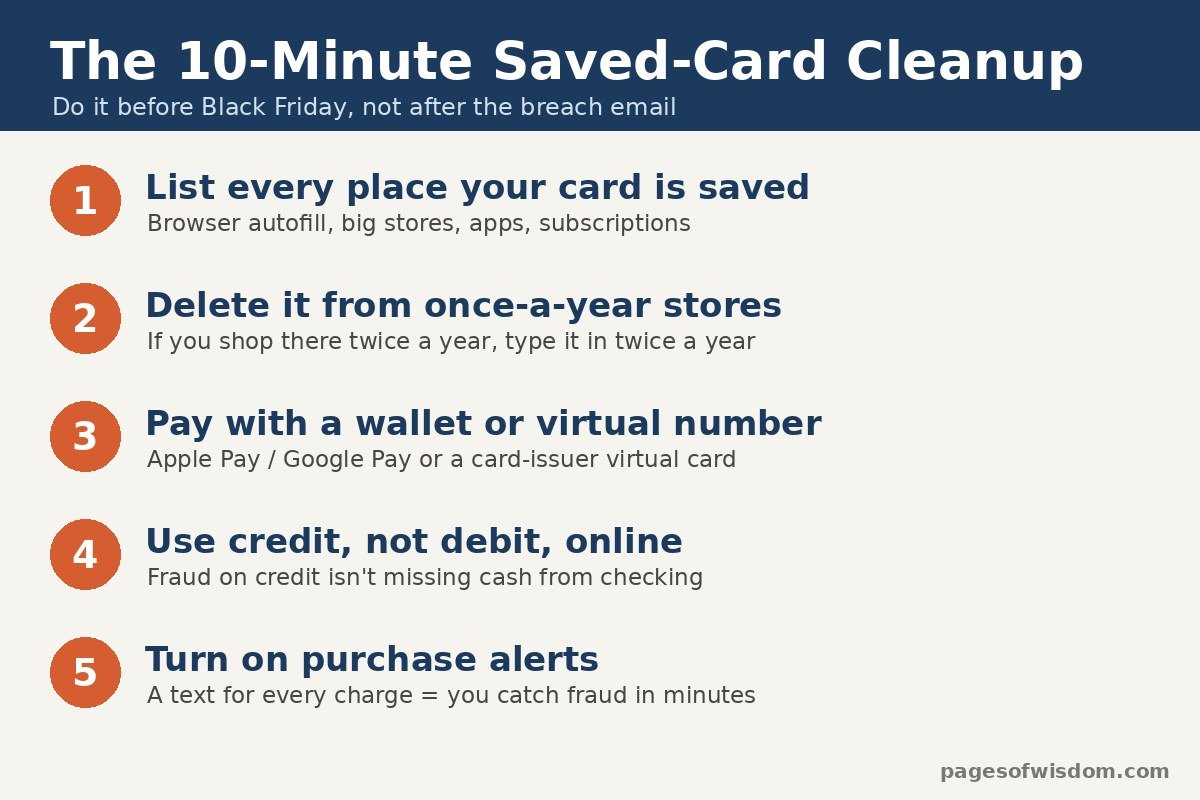
The 10-minute saved-card cleanup
Grab your phone, a cup of coffee and maybe a notepad. Here’s the order to do it in.
Step 1: Make a list of where your card is saved (3 minutes)
Think about where you’ve bought something online in the last couple of years. The usual suspects:
- Your web browser. Chrome, Edge and Safari all offer to remember cards. In Chrome, open the three-dot menu and choose Passwords and autofill, then Payments, per Google’s help page. Cards you added in Chrome are stored in Google Wallet, so you may need to remove them there too.
- The giant stores you use every week (Amazon, Walmart, Target and the like).
- The “bought one thing once” stores: the boot company, the closet store, the site that sold you a single replacement part.
- Food delivery, ride apps, streaming services and anything with a subscription.
Tip: search your email for “order confirmation” or “receipt.” Your inbox remembers stores your brain has long forgotten.
Step 2: Delete your card from the once-a-year stores (3 minutes)
Log in to each store you rarely use, find the account page (usually called Payment methods, Wallet or Saved cards) and remove the card. A saved credit card at a store you visit once a year is all risk and almost no reward. If you only shop there twice a year, typing your card in twice a year is a small price. Keep saved cards, at most, on the one or two big stores you use constantly, and make sure those accounts have a strong password and two-step login turned on.
Step 3: Let a stand-in number do the paying (2 minutes to set up)
You have two easy ways to shop without handing a store your real card number:
- Phone wallets. When you add a card to Apple Pay, your bank creates a separate “Device Account Number” that lives on your phone, and each purchase uses a one-time security code, Apple explains. Apple says it doesn’t store your original card number, and the bank can block that device number from being used on a regular card or over the phone. Google Wallet does the same thing with what it calls a device token, so your real card number isn’t shared with the store, Google says. When a store offers a wallet button at checkout, use it.
- Virtual card numbers. Some card companies will make you a separate card number tied to your real account. Capital One’s help page says eligible cardholders can create one for online shopping in general or one that only works at a single store, and lock or delete it without touching the real card. Citi and some other issuers offer similar tools, so check your card’s app for “virtual card.”
Think of a virtual number like a valet key. It starts the car, but it doesn’t open the glove box, and if the valet turns out to be shady, you cancel that one key instead of changing every lock in the house.
Step 4: Shop online with credit, not debit (0 minutes, just a habit)
We covered this briefly in our 60-second fake-store check, but the breach angle makes it worth doing the math. More on that in the worked example below.
Step 5: Turn on purchase alerts (2 minutes)
Open your bank or card app and turn on a text or push alert for every charge, or at least every online charge. It’s like a motion light on the porch. You’ll get a few alerts for your own coffee purchases, but the first time a $1 “test charge” shows up from a store you’ve never heard of, you’ll know within minutes instead of at the end of the month.

Worked example: the same $600 fraud on two different cards
Let’s say a crook gets your card number from a hacked store and runs up $600 in charges. Here’s how it plays out depending on which card it was, based on the federal rules summarized by the FDIC:
- Credit card: If the bad charges come from online, phone or mail purchases, the FDIC says your liability is $0. In the meantime, you don’t have to pay the disputed amount while the bank investigates. The $600 is the bank’s problem, not your checking account’s.
- Debit card (number stolen, card still in your wallet): You’re not responsible for the charges if you report them within 60 days after the statement that shows them arrives. Wait longer, and you could be on the hook for charges the bank says would have been stopped if you’d spoken up sooner.
On paper, both can end at $0. In real life, there’s a big difference: with debit, it’s your $600 that has left your checking account while the dispute plays out. If that $600 was supposed to cover the electric bill or a car payment that auto-drafts on the 1st, you’re now juggling late fees for something you didn’t buy. With credit, the bank’s money is the one in limbo. That’s why “credit online, debit at the ATM” is the rule of thumb.
The second wave: fake “breach” and delivery messages
Big hack stories have a predictable sequel. Crooks know you heard about the breach, so they send emails and texts pretending to be the company: “Your order was affected, click here for a refund,” or “Verify your card to keep your account active.” Pair that with holiday shipping season and you get a flood of fake delivery texts. In AARP’s new holiday scam survey, 47% of people said they’d received a fraudulent text about a package, WFSB reported.
Here’s how to handle both:
- Never click a link in a “we were hacked” or “refund” message. Type the store’s web address yourself or open its app, and look for notices there.
- The U.S. Postal Service won’t text you tracking updates unless you signed up for them, and those texts won’t contain a link, says the Postal Inspection Service. FedEx and UPS don’t text out of the blue asking for money or personal details either, per the FCC.
- Track packages using the link in your original order email or the carrier’s own app.
- Forward scam texts to 7726 (SPAM), as the FCC suggests, and report shopping scams at ReportFraud.ftc.gov, as the FTC recommends.
- If a caller says they’re from your bank’s fraud team and asks you to “move your money to a safe account,” hang up and call the number on the back of your card. We broke down exactly how that con works in this story about the fake bank and fake FBI scam.
If you’ve shopped at The Container Store
Based on what the company has said so far, there’s no sign that card numbers were taken, and it says it doesn’t keep them in the first place. The investigation is still going, though, so a calm checklist makes sense:
- Look over your statements for anything you don’t recognize, especially small charges.
- If you reused your Container Store password anywhere else, change it on those other sites. Reused passwords are how one hack turns into five.
- Treat any email about the incident with suspicion until you’ve confirmed it by going to the company’s website on your own.
- If a breach letter ever tells you your Social Security number or driver’s license was taken (that’s not what’s been reported here), a credit freeze is the next move. Our 15-minute breach fix walks through it.
Quick pre-Black Friday checklist
- Card removed from stores you rarely use
- Browser autofill cards reviewed and trimmed
- Apple Pay, Google Pay or a virtual card number ready for checkout
- Credit card, not debit, for online shopping
- Purchase alerts turned on
- A family plan for suspicious calls and texts (our family code word guide pairs well with this one)
What this means for you
The Container Store story has a fairly happy ending for shoppers: the company kept no cards, so there were no cards to steal. You can give yourself that same happy ending for every store you shop at. Delete the card from the places you rarely visit, let a phone wallet or virtual number stand in for your real one, keep debit cards out of online checkouts and turn on alerts. That’s ten minutes this weekend, and it means the next “Retailer X Hacked” headline is just something you read over coffee, not the start of a long week on hold with your bank.
Questions about a weird charge or a text you’re not sure about? Send it through our Contact Us page.
Like plain-English tech tips without the jargon? Check out Andrew’s YouTube channel for more.
Sources
- Neighborhood Intelligence: The Container Store announces restoration of its systems following cybersecurity incident (Nov. 20, 2026)
- Retail Dive: The Container Store is back online after cybersecurity incident (Nov. 20, 2026)
- Chain Store Age: The Container Store resumes digital operations following cyberbreach (Nov. 20, 2026)
- The Record: Container Store restores systems after cyberattack (Nov. 20, 2026)
- SecurityWeek: Revolve puts data breach victim count at 1.5 million (Nov. 9, 2026)
- FDIC: What you need to know about credit and debit card billing issues
- Apple Support: Apple Pay security and privacy overview
- Google: How device tokens keep your payment cards safe in Google Wallet
- Capital One: Using virtual credit cards
- AwardWallet: Citi virtual account numbers explained
- Google Chrome Help: Fill out forms automatically in Chrome
- U.S. Treasury: Annual consumer advisory on holiday scams (Nov. 18, 2026)
- WFSB: AARP says package delivery texts and social media ads are among holiday scams to watch (Nov. 19, 2026)
- U.S. Postal Inspection Service: Smishing and package tracking text scams
- FCC: How to avoid package delivery scams
- FTC: How to avoid holiday shopping scams in your search results (Nov. 2026)




More Stories
Scammers Can Clone Your Kid’s Voice From a 3-Second Clip. Pick a Family Code Word Before the Pie Comes Out
Italy Just Fined Meta $887 Million Over Facebook Peeking at Phone Photos. Here’s How to Check Yours in 2 Minutes
Hackers Stole Nearly 150,000 Uber Drivers’ License Details by Breaking Into an AI Company. Here’s Your 15-Minute Fix