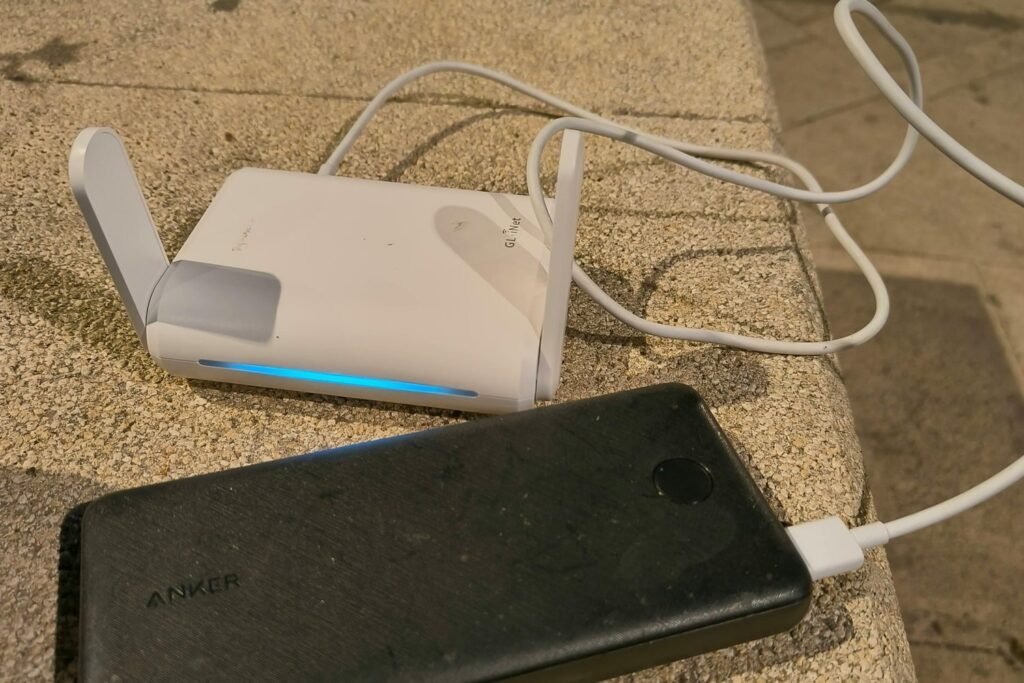
GL.iNet travel routers are popular with travelers, RVers and anyone who wants a VPN on the go. Photo: Danielrosehill, CC BY 4.0, via Wikimedia Commons (cropped).
Imagine you hid a spare house key with a locksmith so you could let the plumber in while you’re on vacation. Handy! Now imagine somebody broke into the locksmith’s shop and walked out with a copy of every key on the wall. Your front door is just as sturdy as it was yesterday. The problem is that someone else is now holding a key to it.
That’s roughly what happened this week to some owners of GL.iNet routers, the small, popular travel routers that people tuck into backpacks, campers and RVs, or use at home to run a VPN. GL.iNet says a criminal found a hole in its cloud remote-management service, the feature that lets you control your router from anywhere, and used it to install malicious software on some routers and remote-control boxes. When one outlet published its write-up on Nov. 21, it said it had found no other news coverage. So if you own one of these, you might be hearing about it here first.
Here’s what happened in plain English, a quick way to tell whether you should care, and a step-by-step fix that doesn’t require you to be a computer person. Stick around for the last part, too, because there’s a lesson in this for every router owner, not just GL.iNet folks.
What happened in the GL.iNet router hack
These are the facts GL.iNet has confirmed in its official security notice, which it issued Nov. 20 and updated Nov. 21, 2026:
- On Nov. 20, GL.iNet found a vulnerability in its cloud remote-management service. An “unauthorized party” had used it to get into some GL.iNet routers and KVM devices (more on those below) and install malicious software.
- GL.iNet says it fixed the hole on its end and blocked the access the attacker used, so devices can’t be newly infected that way.
- Here’s the catch: GL.iNet says closing the hole does not remove malware from devices that were already infected. That part is up to owners.
- Security firmware (the router’s built-in software) for both routers and KVMs was scheduled for Nov. 22. KVM owners can already get a test (“beta”) version.
- GL.iNet says it will email affected customers at the address on their GL.iNet cloud account, but you don’t have to wait for that email to check your device.
What GL.iNet hasn’t said yet matters too. As of this weekend, the company had not published how many devices were hit, which models, when the attacks started, or what the malware actually does. Privacy Affairs and IPCRIME both point out those gaps, and GL.iNet’s own forum is full of owners asking the same questions.
Wait, what’s GL.iNet, and what’s “GoodCloud”?
GL.iNet makes compact routers with rock-and-gem names like Beryl, Slate, Flint and Brume, plus remote-control boxes called Comet. People like them because they’re cheap, small, and good at running a VPN, which is a private, encrypted tunnel for your internet traffic. You’ll find them in hotel rooms, campers, and in plenty of rural homes, too.
GoodCloud is GL.iNet’s free cloud service. According to GL.iNet’s own documentation, once your router is linked to it, you can check on the router, change its settings, block devices, open its control panel, and even get a command-line window into it from anywhere in the world. That’s the spare key at the locksmith. The documentation also notes that on newer firmware (version 4.10 and up), remote access to the control panel and command line is switched on automatically once a router is linked to GoodCloud.
The KVM boxes are the scarier half of this story. A KVM sits between you and a computer so you can see that computer’s screen and use its keyboard and mouse from far away. Whoever controls the KVM can, in effect, sit at that computer. GL.iNet says it’s still investigating whether computers plugged into infected KVMs were affected.
Do you need to worry? A 30-second sort
- You don’t own anything made by GL.iNet. You’re not affected by this one. Skip down to “The lesson for every router owner.”
- You own a GL.iNet router but never made a GL.iNet account or linked it to GoodCloud. This attack went through the cloud service, so your risk looks lower. Still install the security update when it shows up.
- Your GL.iNet router is (or was) linked to GoodCloud. Do every step below. A community security page that tracks the incident, gl-i.net (it’s run by volunteers, not GL.iNet), quotes GL.iNet staff as saying that what matters most is whether GoodCloud was turned on and connected during the attack, not which firmware version you run.
- You own a GL.iNet Comet KVM. Treat this as urgent, and check the computer it’s plugged into as well.
Which models? GL.iNet hasn’t published a list. Anonymous, unverified reports collected by that volunteer site show traces on 17 router models and 5 KVM models so far, including some very popular travel routers such as the Beryl AX (GL-MT3000), Slate AX (GL-AXT1800) and Flint 2 (GL-MT6000). The volunteers stress that a model missing from their list doesn’t mean it’s safe.
The 20-minute fix, step by step
You’ll need a phone or laptop connected to the GL.iNet router’s Wi-Fi and the router’s admin password. No typing of scary commands required.
- Open the router’s control panel. In a web browser, type the address printed on the router’s label (on GL.iNet routers it’s usually 192.168.8.1) and sign in.
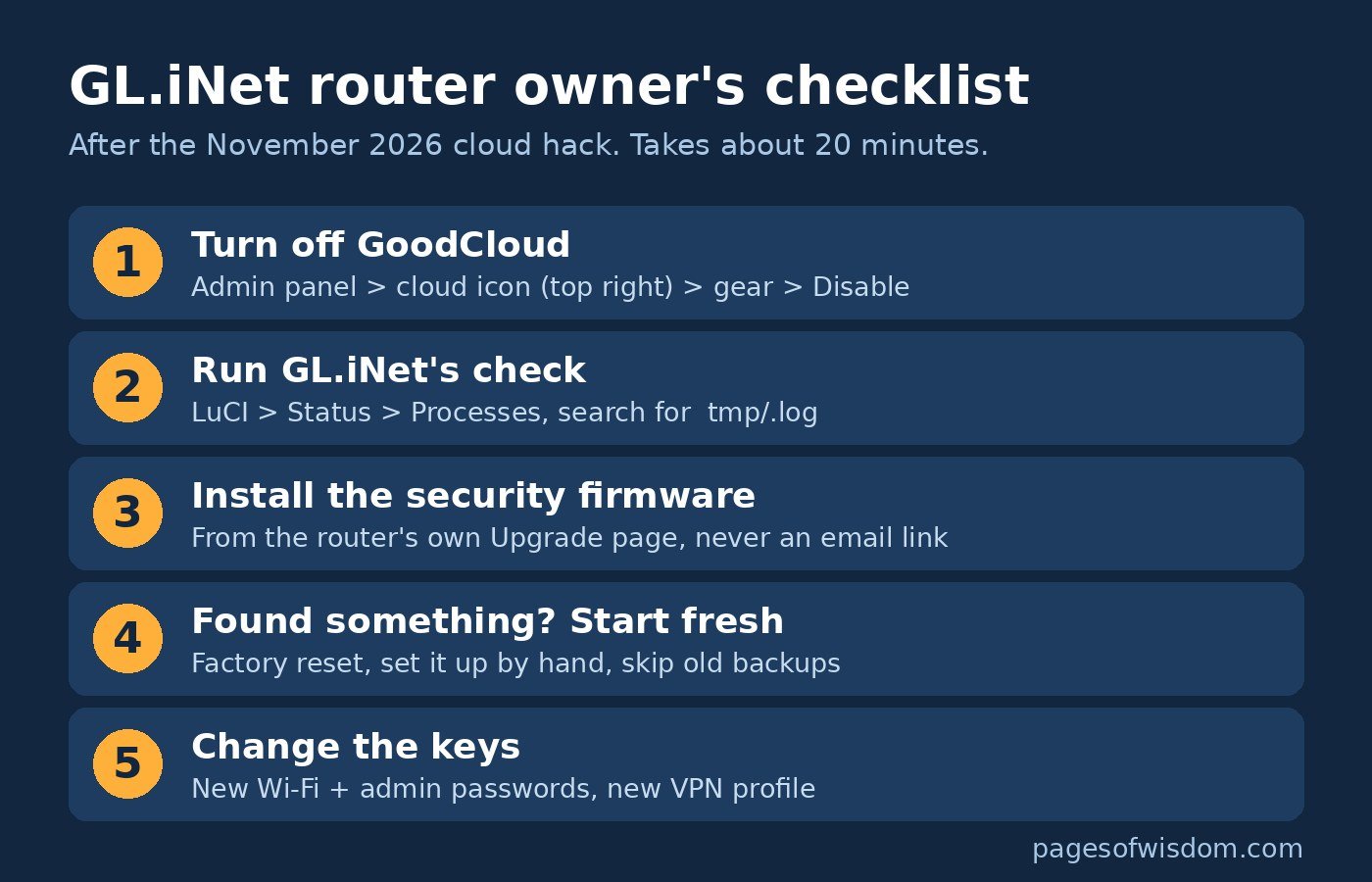
- Turn off GoodCloud. On firmware 4.7 or newer, click the little cloud icon in the top-right corner, click the gear, and choose Disable. On older firmware, it’s under Applications, then GoodCloud. Those steps come straight from GL.iNet’s instructions. Heads-up: if the router lives somewhere far away, like a camper or a cabin, you’ll lose remote access, so make sure you can get to it another way first.
- Run GL.iNet’s official check. Go to System, then Advanced Settings, and sign in to the screen called LuCI (it usually takes the same admin password). Open Status, then Processes. Press Ctrl+F (Command+F on a Mac) and search for
tmp/.log. If you see the exact textcrond -i /tmp/.log, GL.iNet says to treat the router as infected. A line that says/usr/sbin/crond -f -c /tmp/gl_crontabsis normal; GL.iNet staff confirmed that in the forum thread. - Install the security firmware as soon as your model gets it. In the control panel, go to System, then Upgrade, which is where GL.iNet’s upgrade guide points you. According to the volunteer site, GL.iNet staff say the updates are rolling out model by model, so if yours isn’t there today, check again tomorrow. Keep the power on during the update, and only ever update from the router itself or GL.iNet’s official download page, never from a link in an email.
- If the check found something, start fresh. GL.iNet says a factory reset clears the infection. That means holding the Reset button for about 10 seconds while the router is on, then setting it up again. Set it up by hand instead of restoring an old backup, because the backup could bring the problem right back. Volunteer researchers say a reset might not catch everything and suggest reinstalling the firmware with “keep settings” turned off. If you’re not sure, email GL.iNet support and ask.
- Change the keys. If your router was infected, or was linked to GoodCloud and you just want peace of mind, give it a new Wi-Fi password and a new admin password. If it runs a VPN, sign in to your VPN provider’s website, delete the old router setup (often called a WireGuard or OpenVPN profile) and make a new one, as Privacy Affairs recommends. That way, anything copied off the router stops working.
Comet KVM owners: GL.iNet lists the fixed beta firmware as version 1.10.2 for most Comet models and 1.8.6 for the Comet Q. You get it from GL.iNet’s download center and install it with Local Upgrade. If your KVM looks infected, GL.iNet also says to look over the computer it controls for programs, browser extensions or user accounts you don’t recognize, plus odd startup items, and to run a full scan with up-to-date security software. If anything looks off, change the passwords for accounts you used on that computer.
One more warning: watch for fake “GL.iNet” emails
GL.iNet really is emailing affected customers. Scammers know that, and a real security scare is the perfect cover for a fake one. If you get an email about this, don’t click its links and don’t download any “fix” it attaches. Open your router’s control panel yourself, or type GL.iNet’s web address into your browser by hand. It’s the same move that beats bank scams, and we walked through exactly how those work in this story about a fake bank text and a fake FBI agent.
The lesson for every router owner
This isn’t only a GL.iNet problem. It’s a “convenience features are doors” problem. Every switch that says “manage from anywhere” is a door, and you’re trusting whoever holds the other key. Last week we saw the same pattern when Uber drivers’ license details leaked through a company Uber worked with, not through Uber itself.
Andrew learned that lesson early with his own off-grid solar setup here in Mountain Grove, Missouri. When he set up his EG4 system, he saw open ports on his network and took it off Wi-Fi on day one. Fewer doors, fewer surprises. If you run EG4 gear yourself, our 15-minute EG4 security check applies the same thinking to solar inverters.

Here’s a five-minute checkup for any router, from any brand. Most of it comes straight from the federal cybersecurity agency’s home network security guide:
- Turn off remote management you don’t use. CISA’s advice is blunt: most routers let you view and change settings over the internet, and you should turn that off to keep strangers out. Look for words like remote management, remote access, cloud or web access in your router’s app or settings.
- Keep the firmware updated. CISA says to check that your router is on the latest firmware and notes that some routers can update themselves automatically. If yours can, switch that on. It’s the router version of the computer updates we covered in our Patch Tuesday guide.
- Turn off UPnP unless you need it. It’s a setting that lets gadgets open doors in your router on their own. CISA warns that malware can use it to slip past your router’s firewall.
- Check who’s connected. Most router apps list connected devices. If you see something you don’t recognize, change the Wi-Fi password.
- Replace the router if it’s orphaned. If the manufacturer no longer releases updates for your model, it will never get fixes for new holes. That’s our own rule of thumb, not CISA’s, but it’s a good one.
Why it matters to you
Your router is the front door for every gadget in your house or camper: phones, laptops, the doorbell camera, the kids’ tablets. It sees all the traffic before your VPN scrambles it. A router with malware on it doesn’t need to break your VPN, because, as Privacy Affairs puts it, it sits in front of it. That’s why a hacked router is a bigger deal than a hacked app.
The good news is that the fix is mostly free and mostly clicks: turn off the cloud feature, run one check, install one update, and change a couple of passwords. Twenty minutes this weekend beats wondering for the next six months whether someone else has a key to your network.
What we still don’t know
- How many devices were infected, and exactly which models and firmware versions.
- What the malware does, including whether it copied passwords, VPN keys or traffic.
- Whether computers connected to infected KVMs were affected. GL.iNet says it’s still checking.
- When every router model will have its security firmware. Check GL.iNet’s notice for updates.
Got a GL.iNet router and stuck on one of these steps? Tell us what you’re seeing through our Contact Us page and we’ll try to point you in the right direction.
Want more tech tips that skip the jargon? Swing by Andrew’s YouTube channel for more.
Sources
- GL.iNet: Security Notice 2026-11-20, Router and KVM Security Incident (updated Nov. 21, 2026)
- GL.iNet Community Forum: Quickly check if your router is under attack (Nov. 21, 2026)
- Privacy Affairs: GL.iNet says attackers used its cloud service to plant malware on routers and KVMs (Nov. 21, 2026)
- IPCRIME: GL.iNet confirms cloud-flaw malware infections on some routers and KVM devices (Nov. 22, 2026)
- gl-i.net (unofficial community site): CSA-2026-01, cloud remote management flaw used to install malware (updated Nov. 22, 2026)
- GL.iNet Router Docs: GoodCloud (binding, remote access and how to disable)
- GL.iNet Router Docs: Firmware upgrade
- CISA: Home Network Security


More Stories
The Container Store Got Hacked Days Before Black Friday. Here’s the 10-Minute Saved-Card Cleanup Every Shopper Should Do
Scammers Can Clone Your Kid’s Voice From a 3-Second Clip. Pick a Family Code Word Before the Pie Comes Out
Italy Just Fined Meta $887 Million Over Facebook Peeking at Phone Photos. Here’s How to Check Yours in 2 Minutes