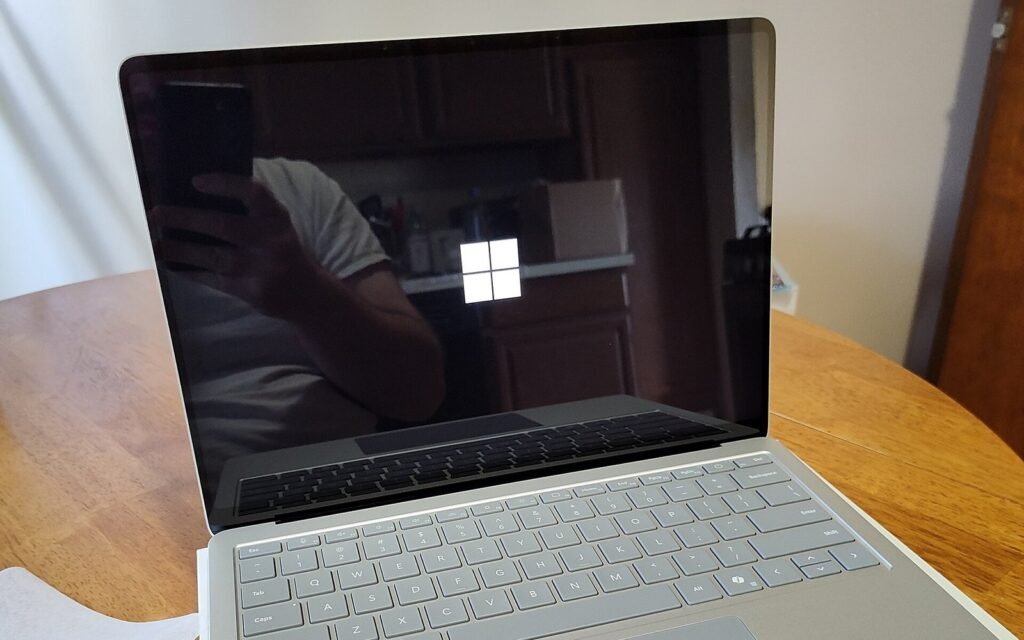
A Windows 11 laptop starting up. Photo: StrangeApparition2011, CC0, via Wikimedia Commons (cropped).
Your laptop’s lock screen is supposed to be the bouncer at the door. It doesn’t care how charming you are; no PIN, no entry. This week a security researcher showed that the bouncer on a lot of Windows 11 laptops can be distracted by, of all things, Windows’ own built-in screen reader. Once it’s distracted, someone holding your laptop can wander inside and start running programs without ever knowing your password.
The trick is called FastUnlock. It was posted publicly on Nov. 19, 2026, Microsoft hasn’t fixed it yet, and the next regular Windows security update isn’t due until Dec. 8. That gap lands right on top of Thanksgiving travel, when laptops ride along to airports, hotels, Grandma’s spare bedroom and the back seats of a whole lot of cars.
Nobody can pull this off over the internet, and there’s no sign anyone has used it on real victims yet. So this is not a reason to panic. It is a good reason to spend 10 minutes learning which kind of laptop you have and doing the one or two things that actually help. Here’s the plain-English version.
What FastUnlock is, in plain English
According to the researcher’s own write-up on GitHub and an independent test by the security company ThreatLocker, here’s the gist without the hacker how-to:
- Someone has your laptop in their hands, sitting at the Windows sign-in screen.
- They start down the “I forgot my PIN” path, the one meant to help you reset a forgotten PIN through your Microsoft account.
- From there they switch on Narrator, the Windows feature that reads the screen out loud for people who are blind or have low vision. Because of a mistake in Narrator’s recently redesigned look, it opens a hidden window that leads into the Windows Settings app, even though the PC is still locked.
- From Settings, a USB flash drive plugged into the laptop can be opened and a program on it can be run.
The researcher, who posts as Nightmare Eclipse and MSNightmare, says it took him five minutes to go from finding the bug to getting into a fully encrypted laptop running Windows 11 version 26H2 with the November 2026 updates installed. He also says it worked on every machine he tried. The Hacker News reported that ThreatLocker tested it the same day and found that it works.
Now the fine print, because it matters. The program runs as a limited, behind-the-scenes Windows account (called WsiAccount) that ThreatLocker says is not an administrator. That’s a foothold, not the keys to the kingdom. The bad news is that, according to Privacy Affairs, the researcher says a second bug he released on Nov. 10, which he calls SignDrop, could turn that foothold into full control on PCs that are vulnerable to it.
Wait, doesn’t BitLocker encryption protect me?
Many Windows 11 laptops scramble (encrypt) their drive automatically. On Pro editions that’s called BitLocker. On Home editions it’s called Device Encryption, and Microsoft says it switches on by itself on many PCs when you set them up with a Microsoft account. Encryption is great if someone pulls your drive out and plugs it into another computer. They just see gibberish.
Here’s the catch. In the default setup, a security chip in the laptop (the TPM) unlocks the drive automatically every time the laptop starts, so you don’t have to type an extra code. Think of a safe that pops open whenever it’s plugged in, with a guard (the lock screen) standing in front of it. FastUnlock doesn’t crack the safe. It slips past the guard. As The Hacker News put it, by the time the lock screen appears, the files are already readable.
Is your laptop exposed? The 2-minute sort
Based on what the researcher has described and what independent testers and security writers have worked out so far, two things decide your risk. Check both:
- Do you sign in with a Microsoft account? Open Settings > Accounts > Your info. If you see an email address and “Microsoft account,” that counts. The researcher says at least one account on the PC has to be linked to an online account for the trick to work. If every account on the PC is a plain local account, you’re not in the situation he described, though Microsoft hasn’t confirmed that.
- Which edition of Windows do you have? Open Settings > System > About and look for “Edition” under Windows specifications. Home and Pro get different options below.
Then match yourself to one of these:
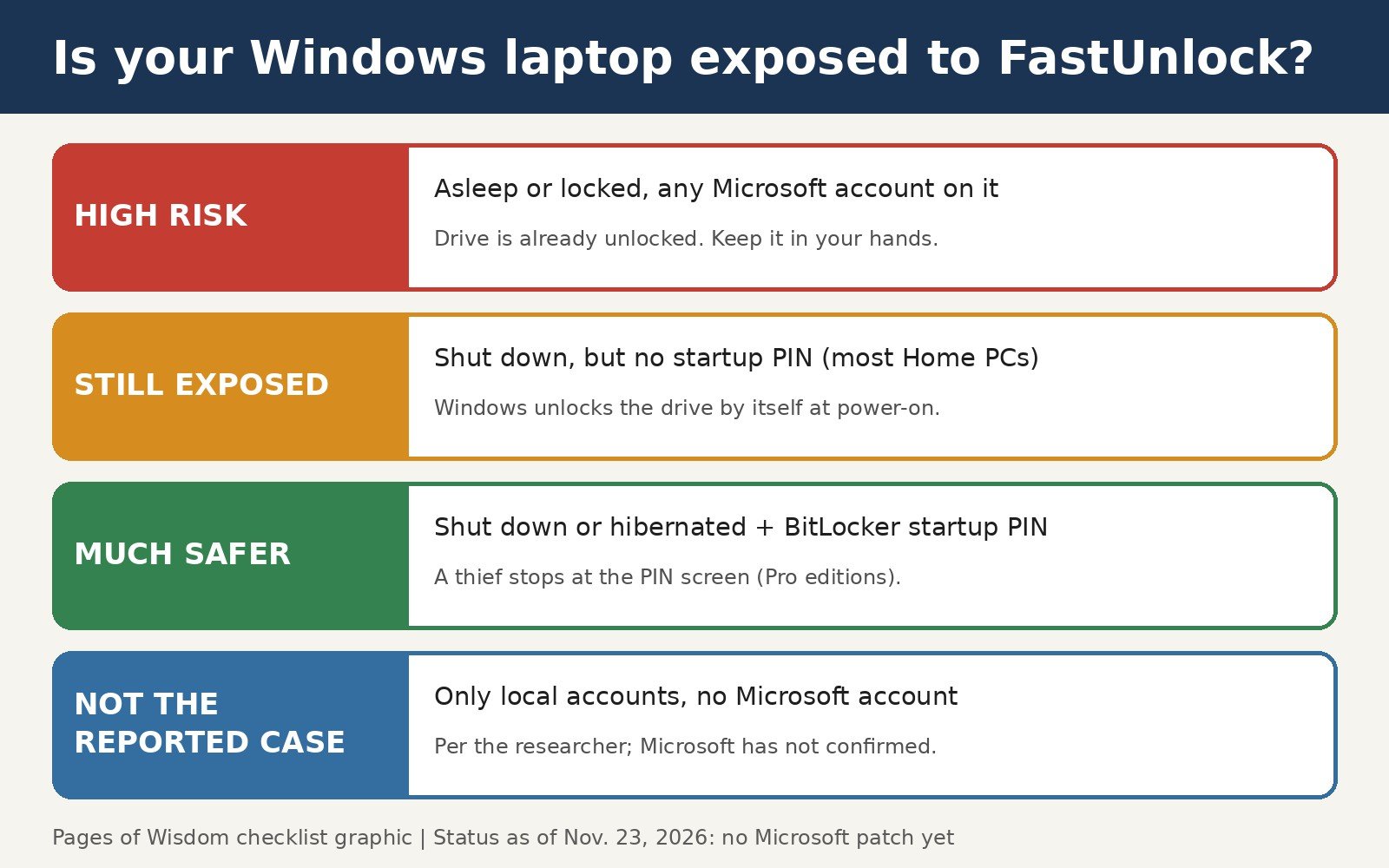
- Laptop asleep or locked: exposed if a Microsoft account is on it. The drive is already unlocked while it sleeps.
- Laptop shut down, but no startup PIN (most Home PCs and most Pro PCs as they come from the store): still exposed. Windows unlocks the drive by itself the moment someone presses the power button.
- Laptop shut down or hibernated, with a BitLocker startup PIN: much safer. Whoever has it gets stuck at a PIN prompt before Windows and its lock screen ever load. That’s the reading of Privacy Affairs, ThreatLocker and ComputingForGeeks, and it matches Microsoft’s own BitLocker advice for hands-on attackers. Nobody has published a test proving it against FastUnlock specifically, so call it “very likely,” not “guaranteed.”
- Work laptop: it depends on how your company set it up. Ask your IT folks instead of changing settings yourself.
- Windows 10: unknown. The researcher says he hasn’t checked it, so treat it the same way if you travel with it.
What to do this week, step by step
Everyone: keep it in your hands, and back up your recovery key
- Treat your laptop like your wallet this week. Since this attack needs someone physically holding the machine, the single best fix costs nothing. Don’t leave it on a charging bar while you grab coffee, in a car seat at the gas station, or open on a hotel desk while you go to breakfast.
- Save your BitLocker recovery key somewhere other than the laptop. If you ever change encryption settings (or a repair shop does), Windows can ask for this long number. Sign in at aka.ms/myrecoverykey with your Microsoft account to see it, then write it down or print it and keep it at home.
- Turn on Find my device. Go to Settings > Privacy & security > Find my device. Microsoft explains that you can then sign in at account.microsoft.com/devices to see the laptop on a map and lock it remotely. It has to be turned on before the laptop goes missing, and your account needs to be an administrator.
- Make sure encryption is actually on. On Home, check Settings > Privacy & security > Device encryption. If your drive isn’t encrypted at all, a thief doesn’t need FastUnlock; anyone can read the drive by starting the laptop from another system.
- Install Microsoft’s fix the day it shows up. Watch Windows Update on or after Dec. 8, or sooner if Microsoft ships an emergency patch. Our guide to Microsoft’s November security updates walks through checking for updates if you’re rusty.
Windows 11 Pro: add a startup PIN
This is the strongest fix available today, but it takes a few careful steps. If you’re not comfortable with them, skip it and lean on the “keep it with you” rule. Microsoft recommends this setup for laptops that might fall into a stranger’s hands, and Privacy Affairs lays out the steps:
- Back up your recovery key first (see above). Seriously, first.
- Press the Windows key, type gpedit.msc and open it.
- Go to Computer Configuration > Administrative Templates > Windows Components > BitLocker Drive Encryption > Operating System Drives.
- Open Require additional authentication at startup, choose Enabled, and allow a startup PIN with TPM.
- Open Terminal as administrator and run:
manage-bde -protectors -add C: -TPMAndPIN. Windows will ask you to choose the PIN. - Pick a PIN longer than six digits. Privacy Affairs notes separate research showing a six-digit BitLocker PIN can be brute-forced in about 20 days on some laptops with AMD processors.
- Restart to make sure the PIN prompt appears before Windows loads. From now on, shut down or hibernate the laptop before it leaves your hands, because the PIN only protects a laptop that’s off, not one that’s asleep.
Windows 11 Home: your options are fewer
Home’s Device Encryption has no startup PIN option, so shutting the laptop down doesn’t add much protection here. Windows unlocks the drive by itself at power-on. That leaves two real choices until Microsoft patches it:
- Keep the laptop with you (the free, easy one).
- Switch to a local account under Settings > Accounts > Your info > Sign in with a local account instead. That takes you out of the conditions the researcher described, but you lose syncing and the automatic sign-in to Microsoft apps. Back up your recovery key before you do it. Honestly, for most families, this is more hassle than a few weeks of keeping an eye on the laptop.

Who’s actually at risk (and who can relax a little)
Let’s keep this in proportion. Plenty of laptop thieves are mostly after the hardware, not your tax returns. FastUnlock matters most if your laptop holds things that could hurt you in the wrong hands: saved passwords in the browser, scanned IDs, tax documents, banking sessions, work files, or family photos you’d rather not see on the internet.
The people who should take it most seriously are travelers this week, anyone who carries a laptop for work, small-business owners with customer records on a laptop, and families with a shared PC in a busy house. If your laptop rarely leaves your desk at home, your risk is low, but the recovery key and Find my device steps are still worth five minutes.
While you’re thinking about travel tech, two related reads: if you carry a little travel router, check our 20-minute GL.iNet router check, and if you’re booking trips online, our guide to holiday travel scams after the Expedia breach covers how to keep a holiday trip scam-free.
The bigger lesson: plan for the day your laptop walks off
Here’s our honest take after reading every write-up we could find: the scariest part of FastUnlock isn’t the trick itself. It’s that most of us treat the lock screen as the only wall between a stranger and our whole life. Security people call this “defense in depth,” which is a fancy way of saying don’t rely on one lock. You lock the front door, but you also don’t leave the truck keys on the porch.
Andrew applies the same thinking to his own gear. When he set up his EG4 off-grid solar system at home, he noticed open network ports and took the equipment off Wi-Fi on day one rather than trusting the default setup. Laptops deserve the same suspicious streak: assume the default settings were made for convenience, then add your own layer.
For a laptop, those layers look like this: encryption that’s actually on, a recovery key you can find, a startup PIN where your edition allows it, Find my device switched on, and a backup of your important files somewhere other than the laptop. If the backup part makes you nervous, our 10-minute backup fix is a good place to start. If the laptop ever does disappear, you’re out a gadget, not your identity and your photos.
Why it matters to you
- There’s no Microsoft fix yet. As of Nov. 23, 2026, we couldn’t find a patch, advisory or official tracking number (CVE) for FastUnlock. The next scheduled update is Dec. 8.
- It only works with the laptop in someone’s hands. Nobody can do this to you over the internet, and no real-world attacks have been reported.
- Sleep is not off. A sleeping or locked laptop has its drive unlocked. On Pro with a startup PIN, shut it down or hibernate it before it leaves your sight.
- Home users: your best protection for the next few weeks is simply not letting the laptop out of your sight.
- Everyone: back up your recovery key, turn on Find my device, and install the patch the day it arrives.
Stuck on one of these steps or not sure which edition you have? Send us a note through our Contact Us page and we’ll try to point you in the right direction.
Like your tech tips with a side of country common sense? Come hang out on Andrew’s YouTube channel.
Sources
- MSNightmare on GitHub: FastUnlock, Windows Narrator lock screen bypass (posted Nov. 19, 2026)
- ThreatLocker: Proof of concept for FastUnlock, Windows lock screen bypass (Nov. 2026)
- The Hacker News: New unpatched Windows 0-day FastUnlock lets someone holding a locked PC run programs on it (Nov. 20, 2026)
- TechSpot: A new Windows zero-day reportedly gets past BitLocker using only the screen reader and a USB stick (Nov. 21, 2026)
- Privacy Affairs: New Windows 11 zero-day FastUnlock gets past the lock screen and BitLocker through Narrator (Nov. 19, 2026)
- Hardware Busters: FastUnlock zero-day affects BitLocker PCs on Windows 11 (Nov. 2026)
- ComputingForGeeks: FastUnlock Windows 11 lock-screen flaw, what reduces exposure (updated Nov. 22, 2026)
- Microsoft Learn: BitLocker countermeasures
- Microsoft Support: Device Encryption in Windows
- Microsoft Support: Find and lock a lost Windows device


More Stories
Hackers Used GL.iNet’s Own Cloud to Break Into Travel Routers. Here’s the 20-Minute Check Every Owner Should Do
The Container Store Got Hacked Days Before Black Friday. Here’s the 10-Minute Saved-Card Cleanup Every Shopper Should Do
Scammers Can Clone Your Kid’s Voice From a 3-Second Clip. Pick a Family Code Word Before the Pie Comes Out